Confluence Server & Data Center

Your Confluence, as Markdown.
For you and your agents.

Pull a page, edit it anywhere, push it back. Whatever you did not touch comes back byte for byte — macros, layouts, line breaks, colours and all.

GitHub →
  • 0 dependencies
  • 400+ tests
  • 76 of 76 real pages byte for byte
  • MIT
An amber drop with a fern preserved inside it.

Give an agent your wiki without giving it a shredder

Atlassian's MCP server stops at Cloud. This one runs against the Confluence your company hosts itself, and hands an agent four operations with the guardrails built in: it cannot silently drop a macro, and it cannot publish over an edit somebody made while it was working.

{
  "mcpServers": {
    "confluence": {
      "command": "amber-confluence-mcp",
      "env": { "AMBER_CONFLUENCE_URL": "https://wiki.example.com" }
    }
  }
}

confluence_pull

read a page as Markdown

confluence_push

replace the page body

confluence_replace

change one passage, leave the rest alone

confluence_status

see whether a local copy went stale

Refusals reach the agent as plain text it can read and act on, not as errors it has to guess about. Works in Claude Desktop, Claude Code and any other MCP client.

No Markdown. No diffs. No agents.
Just the browser.

That is life on every self-hosted Confluence today. Atlassian's tooling only talks to Cloud, so nothing on your machine reaches your own wiki.

And the raw page format is a trap. One careless edit takes out the macros, the anchors and the column layouts, and a colleague finds out days later.

Three commands, and you are done

$ amber confluence pull 100000001
Onboarding  (v12, space DEMO)
~/amber/pages/100000001.md
3 opaque block(s): ⟦macro.toc#1⟧ ⟦macro.warning#1⟧ ⟦macro.status#1⟧

$ amber confluence diff 100000001
  ## Owners
- Analyst: John Doe
+ Analyst: John Doe, standing in for the release
+ ## Rollout
+ Staged, two regions first.

$ amber confluence push 100000001 -m "rollout section"
Onboarding  v12 -> v13

Byte for byte. Not best effort.

Every other converter reads your macros, turns them into something else and tries to rebuild them on the way back. That is where panels lose their colour, status lozenges turn into plain words and column layouts collapse.

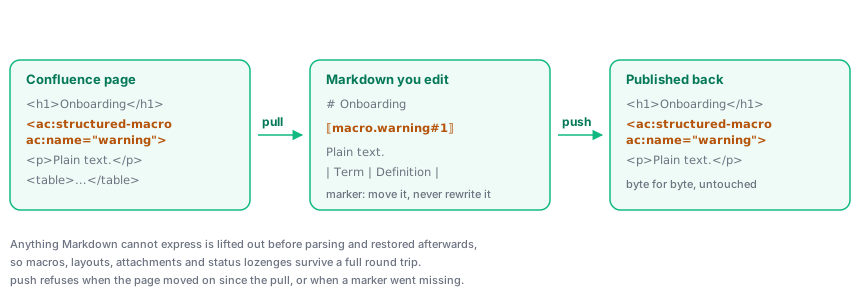
This one rebuilds nothing it does not have to. Whatever Markdown cannot carry is lifted out before the conversion and dropped back in afterwards, unchanged. A marker shows you where it sits, so you can move it or delete it on purpose — and cannot corrupt it by accident.

And every paragraph you did not edit goes back as its original markup, not a re-rendering of it. Tested on 76 real pages from public Confluence 9.2 and 10.2 instances: untouched, every one comes back identical to the last byte.

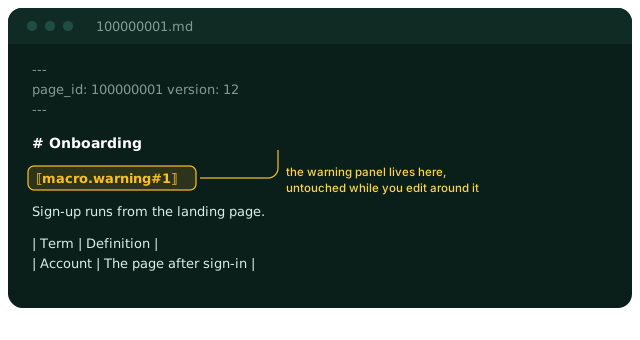
An editor window showing the page as Markdown, with a marker where the warning panel sits.
A page is pulled into Markdown with markers standing in for macros, edited, and pushed back with the macros restored byte for byte.

It will not let you overwrite a colleague

Publishing stops when the page moved on since your pull, and names who changed it and when. It stops again when a marker went missing from your text, and names every block that would have disappeared. Both exit with status 2, so a script can tell a refusal from a crash.

$ amber confluence push 100000001
Refusing to publish: the page changed after you pulled it.
  your copy: v12
  on the server: v14, last edited by John Doe at 2026-09-20T09:14:00Z

Pull again and reapply your edit, or repeat with force to overwrite their work.

Old instances included

Data Center 7.9+A personal access token from your profile settings.
Anything olderYour usual password. Those versions have no tokens, and plenty of companies still run them.
A public wikiNothing at all.

Credentials live in your system keychain, never in a config file. Put a token in the config file and it refuses to start, and tells you where the token belongs.

Try it on the page you have open right now.

One package, no dependencies, installs in under a second.

GitHub →